
To access the Cleo AS400 via TN5250 you will need to download the Mocha TN5250 Software.
You will select the Windows 7/8/10 with Version 3.7 or higher
Download Link: http://mochasoft.dk/downloadwindows7-8.htm
We have an unlimited number of downloads for Cleo.
During the installation there is a button at the bottom that allows you to register the software. You must register the software otherwise you will be installing a 30 day trial and they will prompt you for payment at the end of the 30 days.
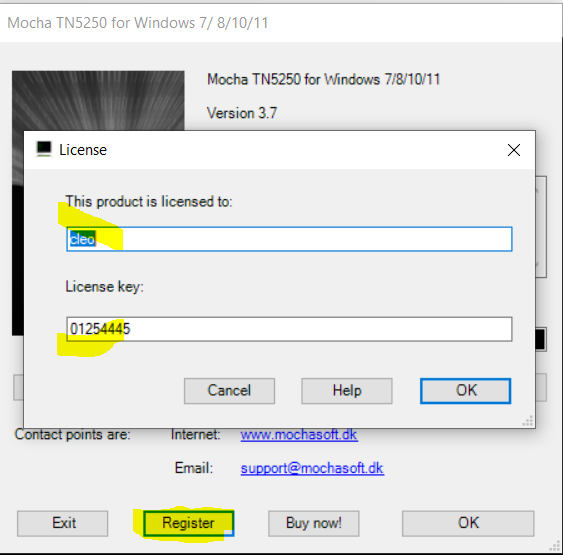
To Register, you MUST enter "cleo" on who the product is licensed to. This will place the license under our account.
For the License Key use "01254445"
|
Information from Mocha Software: If you have any further queries please contact us at support@mochasoft.dk |
Make sure you are on the VPN for Access to the AS400.
Once the software is installed and running.
You will want to select FILE and then EDIT/NEW SESSION.
There are two partitions on the AS400.
EXPAP71 with IP Address: 172.16.0.8
EXPAP72 with IP Address: 172.16.0.9
Here is an example
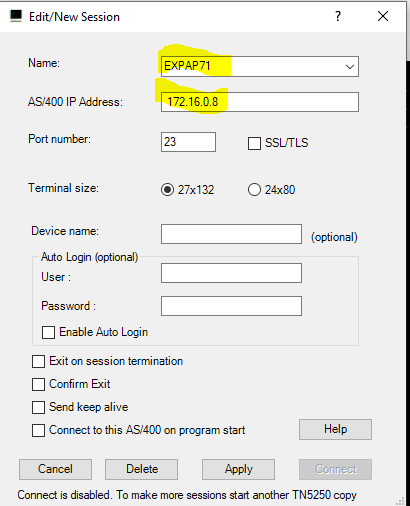
After configuring the connection to the AS400 you will then go to FILE and select CONNECT.
This will then prompt you for the login to the AS400.
Comments
0 comments
Please sign in to leave a comment.